

No frameworks. No SDKs. Just an LLM, a loop, and some tools.
There's a lot of mystique around AI agents out there right now. I just wanted to help dispel some of that.

An AI agent is a language model in a loop that can call tools. That's it. Once you see the pattern, you can't unsee it, and if you stick with me through this, you'll never need someone to explain "agentic AI" to you again.
We're going to build an agent from scratch. Raw HTTP calls to the Anthropic API. No frameworks, no SDKs. The examples use claude-sonnet-4-5-20250514 — swap in whatever the latest model is. The Go and Python versions use nothing beyond the standard library; the Rust version needs a couple of crates (ureq for HTTP, serde for JSON) because Rust's stdlib intentionally doesn't ship an HTTP client.
We'll build in three steps:
- Call the API — the simplest possible request/response
- Add a loop — turn a one-shot call into a conversation
- Add tools — let the model actually do things
By the end, you'll have a working agent that can read files, list directories, and answer questions about your codebase, documentation, workflows, or any folder of files. More importantly, you'll understand exactly what every "agent framework" is doing under the hood.
Step 1: Call the API
Before we build an agent, let's make sure we can talk to Claude at all. "Hello, are you there?" The Anthropic Messages API takes a JSON payload and returns a JSON response. Three headers, one POST request.
package main

import (
    "bytes"
    "encoding/json"
    "fmt"
    "io"
    "net/http"
    "os"
)

// --- Types that map to the Anthropic Messages API ---

// Message represents a single turn in the conversation.
// Role is either "user" or "assistant".
// Content is `any` because the API accepts a plain string for simple
// messages, but needs an array of structured blocks for tool results.
type Message struct {
    Role    string `json:"role"`
    Content any    `json:"content"`
}

// ContentBlock is one piece of a response. For now, we only care about "text".
// Later, we'll add fields for tool use.
type ContentBlock struct {
    Type string `json:"type"`
    Text string `json:"text,omitempty"`
}

// Request is the JSON body we POST to the Anthropic API.
type Request struct {
    Model     string    `json:"model"`
    MaxTokens int       `json:"max_tokens"`
    System    string    `json:"system"`
    Messages  []Message `json:"messages"`
}

// Response is what the API sends back.
// StopReason tells us WHY the model stopped — "end_turn" means it's done talking.
type Response struct {
    Content    []ContentBlock `json:"content"`
    StopReason string         `json:"stop_reason"`
}

// --- The entire "SDK": one function, one POST request ---

func callClaude(messages []Message) Response {
    body, _ := json.Marshal(Request{
        Model:     "claude-sonnet-4-5-20250514",
        MaxTokens: 1024,
        System:    "You are a helpful assistant.",
        Messages:  messages,
    })

    req, _ := http.NewRequest("POST", "https://api.anthropic.com/v1/messages", bytes.NewReader(body))
    req.Header.Set("Content-Type", "application/json")
    req.Header.Set("X-API-Key", os.Getenv("ANTHROPIC_API_KEY"))
    req.Header.Set("Anthropic-Version", "2023-06-01")

    res, err := http.DefaultClient.Do(req)
    if err != nil {
        panic(err)
    }
    defer res.Body.Close()

    data, _ := io.ReadAll(res.Body)
    var resp Response
    json.Unmarshal(data, &resp)
    return resp
}

func main() {
    messages := []Message{{Role: "user", Content: os.Args[1]}}
    resp := callClaude(messages)
    for _, block := range resp.Content {
        if block.Type == "text" {
            fmt.Println(block.Text)
        }
    }
}
import json
import os
import sys
import urllib.request

# --- The entire "SDK": one function, one POST request ---

def call_claude(messages: list[dict]) -> dict:
    """Send messages to the Anthropic API and return the response."""
    payload = json.dumps({
        "model": "claude-sonnet-4-5-20250514",
        "max_tokens": 1024,
        "system": "You are a helpful assistant.",
        "messages": messages,
    }).encode()

    req = urllib.request.Request(
        "https://api.anthropic.com/v1/messages",
        data=payload,
        headers={
            "Content-Type": "application/json",
            "X-API-Key": os.environ["ANTHROPIC_API_KEY"],
            "Anthropic-Version": "2023-06-01",
        },
    )

    with urllib.request.urlopen(req) as res:
        return json.loads(res.read())


messages = [{"role": "user", "content": sys.argv[1]}]
resp = call_claude(messages)
for block in resp["content"]:
    if block["type"] == "text":
        print(block["text"])
# Cargo.toml
[package]
name = "agent"
edition = "2021"

[dependencies]
ureq = "3"
serde = { version = "1", features = ["derive"] }
serde_json = "1"
use serde::{Deserialize, Serialize};
use std::env;

// --- Types that map to the Anthropic Messages API ---

#[derive(Serialize)]
struct Request {
    model: String,
    max_tokens: u32,
    system: String,
    messages: Vec<Message>,
}

#[derive(Serialize, Deserialize, Clone)]
struct Message {
    role: String,
    content: serde_json::Value, // String for simple messages, array for tool results
}

#[derive(Deserialize)]
struct Response {
    content: Vec<ContentBlock>,
    stop_reason: String,
}

// ContentBlock is one piece of a response. For now, we only care about "text".
// Later, we'll add fields for tool use.
#[derive(Serialize, Deserialize, Clone)]
struct ContentBlock {
    #[serde(rename = "type")]
    block_type: String,
    #[serde(skip_serializing_if = "Option::is_none")]
    text: Option<String>,
}

// --- The entire "SDK": one function, one POST request ---

fn call_claude(messages: &[Message]) -> Response {
    let body = serde_json::to_string(&Request {
        model: "claude-sonnet-4-5-20250514".into(),
        max_tokens: 1024,
        system: "You are a helpful assistant.".into(),
        messages: messages.to_vec(),
    })
    .expect("serialize request");

    let resp: serde_json::Value = ureq::post("https://api.anthropic.com/v1/messages")
        .header("Content-Type", "application/json")
        .header("X-API-Key", &env::var("ANTHROPIC_API_KEY").expect("ANTHROPIC_API_KEY not set"))
        .header("Anthropic-Version", "2023-06-01")
        .send_bytes(body.as_bytes())
        .expect("API request failed")
        .body_mut()
        .read_json()
        .expect("parse response");

    serde_json::from_value(resp).expect("deserialize response")
}

fn main() {
    let query = env::args().nth(1).expect("Usage: agent <question>");
    let messages = vec![Message {
        role: "user".into(),
        content: serde_json::Value::String(query),
    }];

    let resp = call_claude(&messages);
    for block in &resp.content {
        if block.block_type == "text" {
            if let Some(text) = &block.text {
                println!("{text}");
            }
        }
    }
}
Run it:
export ANTHROPIC_API_KEY="sk-ant-..."
go run main.go "What is the capital of France?"
export ANTHROPIC_API_KEY="sk-ant-..."
python main.py "What is the capital of France?"
export ANTHROPIC_API_KEY="sk-ant-..."
cargo run -- "What is the capital of France?"
That's a working Claude client. Not an agent. Just a one-shot request. But notice: the callClaude function is the only thing talking to the network. Everything we build from here on out is just logic around that one function.
Step 2: Add the Loop
A chatbot is just an API call inside a loop. We read user input, append it to a conversation history, call the API, append the response, repeat.
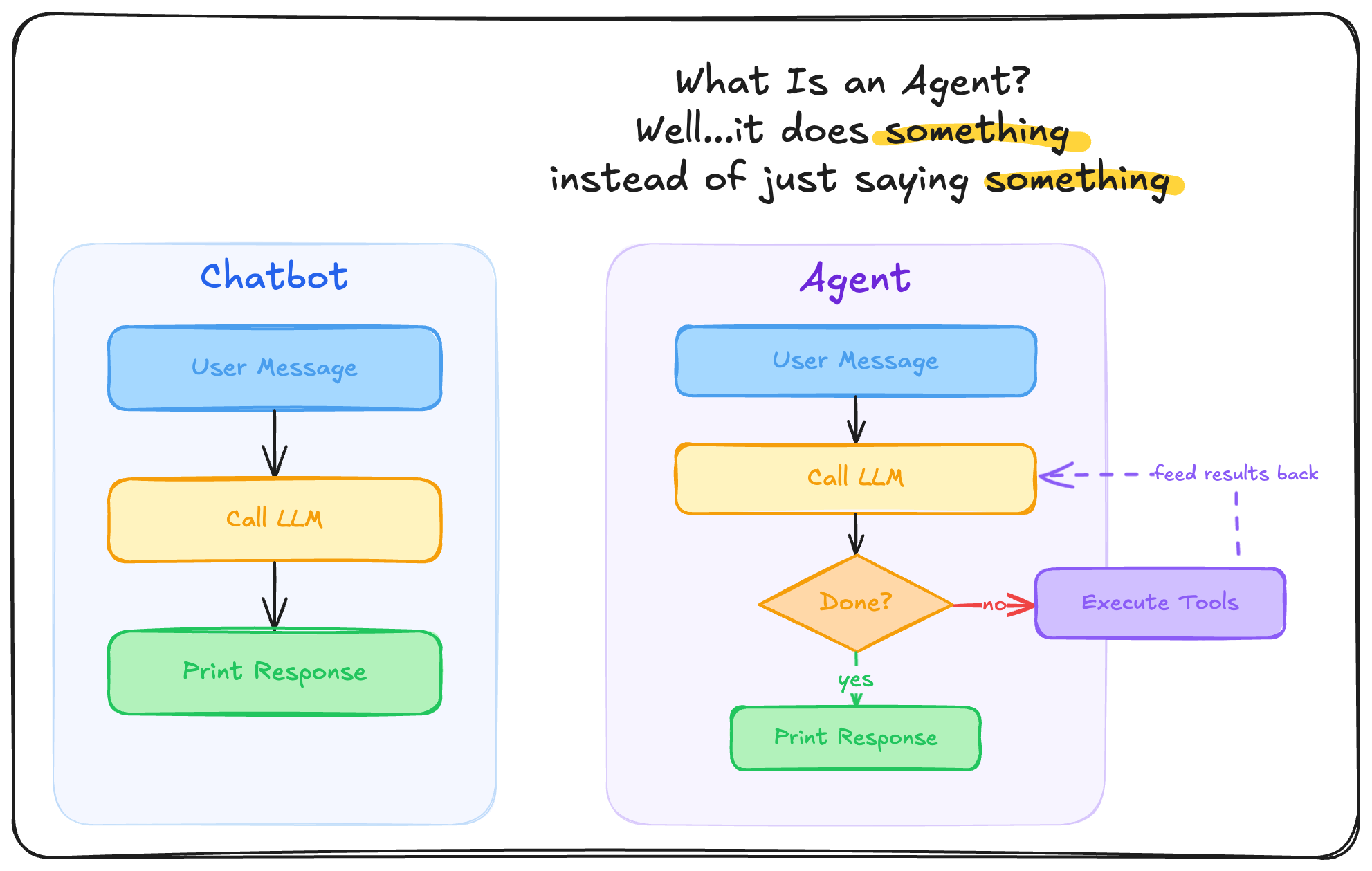
We're building up a messages array that represents the full conversation. Each call sends the entire history, so Claude has context from every previous turn.
func main() {
    scanner := bufio.NewScanner(os.Stdin)
    var messages []Message

    for {
        fmt.Print("\nYou: ")
        if !scanner.Scan() {
            break
        }

        messages = append(messages, Message{Role: "user", Content: scanner.Text()})
        resp := callClaude(messages)

        // Collect the assistant's response and add it to history
        for _, block := range resp.Content {
            if block.Type == "text" {
                fmt.Printf("\nClaude: %s\n", block.Text)
            }
        }
        messages = append(messages, Message{Role: "assistant", Content: resp.Content})
    }
}
messages = []

while True:
    user_input = input("\nYou: ")
    messages.append({"role": "user", "content": user_input})

    resp = call_claude(messages)

    for block in resp["content"]:
        if block["type"] == "text":
            print(f"\nClaude: {block['text']}")

    messages.append({"role": "assistant", "content": resp["content"]})
fn main() {
    let stdin = std::io::stdin();
    let mut messages: Vec<Message> = Vec::new();

    loop {
        eprint!("\nYou: ");
        let mut input = String::new();
        if stdin.read_line(&mut input).unwrap() == 0 {
            break;
        }

        messages.push(Message {
            role: "user".into(),
            content: serde_json::Value::String(input.trim().to_string()),
        });

        let resp = call_claude(&messages);

        for block in &resp.content {
            if block.block_type == "text" {
                if let Some(text) = &block.text {
                    eprintln!("\nClaude: {text}");
                }
            }
        }

        messages.push(Message {
            role: "assistant".into(),
            content: serde_json::to_value(&resp.content).unwrap(),
        });
    }
}
Now we have a chatbot. It remembers context. It can follow up on previous questions. But it still can't do anything. It can only talk.
This is where most "AI integrations" stop. And this is exactly where agents begin.

I came upon this distinction when I was building the KEVin "agent" feature into Kev's TUI. At some point I stopped and asked myself, "Is this really an agent or is this just a chatbot?" You could interact with it, but all you could do was talk to the LLM — it didn't actually do anything. A chatbot answers questions. An agent takes action.
Step 3: Add Tools (This Is the Agent part)
Here's the leap. Most LLM providers support tool use — Anthropic, OpenAI, Google Gemini, Mistral. You describe functions the model can call — name, description, input schema. When the model decides it needs a tool, it stops generating text and instead returns a tool_use content block with the tool name and arguments.
Your (our) job is to execute the tool and send the result back. Then the model continues. That's the agent loop.
Let's add two tools: read_file and list_directory. With just these two, your agent can explore a codebase, documentation, GRC workflows, CSV reports, or any folder of files. The pattern is the same — it's just different tools for different domains.
First, we define the tools and update our types to handle tool calls:
// Tool describes a function the model can call.
type Tool struct {
    Name        string `json:"name"`
    Description string `json:"description"`
    InputSchema any    `json:"input_schema"`
}

// Extend ContentBlock for tool use
type ContentBlock struct {
    Type  string `json:"type"`
    Text  string `json:"text,omitempty"`
    ID    string `json:"id,omitempty"`    // tool_use blocks have an ID
    Name  string `json:"name,omitempty"`  // tool name
    Input any    `json:"input,omitempty"` // tool arguments
}

// Add Tools to the request
type Request struct {
    Model     string    `json:"model"`
    MaxTokens int       `json:"max_tokens"`
    System    string    `json:"system"`
    Messages  []Message `json:"messages"`
    Tools     []Tool    `json:"tools,omitempty"`
}

// Our two tools
var tools = []Tool{
    {
        Name:        "read_file",
        Description: "Read the contents of a file at the given path.",
        InputSchema: map[string]any{
            "type":       "object",
            "properties": map[string]any{"path": map[string]any{"type": "string"}},
            "required":   []string{"path"},
        },
    },
    {
        Name:        "list_directory",
        Description: "List files and directories at the given path.",
        InputSchema: map[string]any{
            "type":       "object",
            "properties": map[string]any{"path": map[string]any{"type": "string"}},
            "required":   []string{"path"},
        },
    },
}
# Our two tools
tools = [
    {
        "name": "read_file",
        "description": "Read the contents of a file at the given path.",
        "input_schema": {
            "type": "object",
            "properties": {"path": {"type": "string"}},
            "required": ["path"],
        },
    },
    {
        "name": "list_directory",
        "description": "List files and directories at the given path.",
        "input_schema": {
            "type": "object",
            "properties": {"path": {"type": "string"}},
            "required": ["path"],
        },
    },
]
// Tool describes a function the model can call.
#[derive(Serialize)]
struct Tool {
    name: String,
    description: String,
    input_schema: serde_json::Value,
}

// Extend ContentBlock for tool use
#[derive(Serialize, Deserialize, Clone)]
struct ContentBlock {
    #[serde(rename = "type")]
    block_type: String,
    #[serde(skip_serializing_if = "Option::is_none")]
    text: Option<String>,
    #[serde(skip_serializing_if = "Option::is_none")]
    id: Option<String>,
    #[serde(skip_serializing_if = "Option::is_none")]
    name: Option<String>,
    #[serde(skip_serializing_if = "Option::is_none")]
    input: Option<serde_json::Value>,
}

// Add Tools to the request
#[derive(Serialize)]
struct Request {
    model: String,
    max_tokens: u32,
    system: String,
    messages: Vec<Message>,
    #[serde(skip_serializing_if = "Option::is_none")]
    tools: Option<Vec<Tool>>,
}

// Our two tools
fn tools() -> Vec<Tool> {
    let schema = |desc: &str| -> Tool {
        Tool {
            name: String::new(), // set below
            description: desc.into(),
            input_schema: serde_json::json!({
                "type": "object",
                "properties": { "path": { "type": "string" } },
                "required": ["path"]
            }),
        }
    };
    vec![
        Tool { name: "read_file".into(), ..schema("Read the contents of a file at the given path.") },
        Tool { name: "list_directory".into(), ..schema("List files and directories at the given path.") },
    ]
}
Next, a function to actually execute a tool call:
func executeTool(name string, input map[string]any) string {
    path := input["path"].(string)
    switch name {
    case "read_file":
        data, err := os.ReadFile(path)
        if err != nil {
            return fmt.Sprintf("Error: %v", err)
        }
        return string(data)
    case "list_directory":
        entries, err := os.ReadDir(path)
        if err != nil {
            return fmt.Sprintf("Error: %v", err)
        }
        var names []string
        for _, e := range entries {
            names = append(names, e.Name())
        }
        return strings.Join(names, "\n")
    default:
        return "Unknown tool"
    }
}
import pathlib

def execute_tool(name: str, tool_input: dict) -> str:
    path = tool_input["path"]
    if name == "read_file":
        try:
            return pathlib.Path(path).read_text()
        except Exception as e:
            return f"Error: {e}"
    elif name == "list_directory":
        try:
            return "\n".join(p.name for p in pathlib.Path(path).iterdir())
        except Exception as e:
            return f"Error: {e}"
    return "Unknown tool"
fn execute_tool(name: &str, input: &serde_json::Value) -> String {
    let path = input["path"].as_str().unwrap_or("");
    match name {
        "read_file" => std::fs::read_to_string(path)
            .unwrap_or_else(|e| format!("Error: {e}")),
        "list_directory" => std::fs::read_dir(path)
            .map(|entries| {
                entries
                    .filter_map(|e| e.ok())
                    .map(|e| e.file_name().to_string_lossy().into_owned())
                    .collect::<Vec<_>>()
                    .join("\n")
            })
            .unwrap_or_else(|e| format!("Error: {e}")),
        _ => "Unknown tool".into(),
    }
}
And finally, the agent loop — the whole point of this write-up 😅 . The only difference from our chatbot loop is: we check stop_reason. If the model says "tool_use", we execute the tools and send results back. If it says "end_turn", we're done.
func main() {
    scanner := bufio.NewScanner(os.Stdin)
    var messages []Message

    for {
        fmt.Print("\nYou: ")
        if !scanner.Scan() {
            break
        }

        messages = append(messages, Message{Role: "user", Content: scanner.Text()})

        // --- THE AGENT LOOP ---
        for {
            resp := callClaude(messages)
            messages = append(messages, Message{Role: "assistant", Content: resp.Content})

            // If the model didn't ask to use a tool, we're done
            if resp.StopReason != "tool_use" {
                for _, block := range resp.Content {
                    if block.Type == "text" {
                        fmt.Printf("\nClaude: %s\n", block.Text)
                    }
                }
                break
            }

            // Execute each tool call and send results back
            var toolResults []any
            for _, block := range resp.Content {
                if block.Type == "tool_use" {
                    input := block.Input.(map[string]any)
                    fmt.Printf("  [tool: %s(%v)]\n", block.Name, input)
                    result := executeTool(block.Name, input)
                    toolResults = append(toolResults, map[string]any{
                        "type":        "tool_result",
                        "tool_use_id": block.ID,
                        "content":     result,
                    })
                }
            }
            messages = append(messages, Message{Role: "user", Content: toolResults})
        }
    }
}
messages = []

while True:
    user_input = input("\nYou: ")
    messages.append({"role": "user", "content": user_input})

    # --- THE AGENT LOOP ---
    while True:
        resp = call_claude(messages)
        messages.append({"role": "assistant", "content": resp["content"]})

        # If the model didn't ask to use a tool, we're done
        if resp["stop_reason"] != "tool_use":
            for block in resp["content"]:
                if block["type"] == "text":
                    print(f"\nClaude: {block['text']}")
            break

        # Execute each tool call and send results back
        tool_results = []
        for block in resp["content"]:
            if block["type"] == "tool_use":
                print(f"  [tool: {block['name']}({block['input']})]")
                result = execute_tool(block["name"], block["input"])
                tool_results.append({
                    "type": "tool_result",
                    "tool_use_id": block["id"],
                    "content": result,
                })
        messages.append({"role": "user", "content": tool_results})
fn main() {
    let stdin = std::io::stdin();
    let mut messages: Vec<Message> = Vec::new();

    loop {
        eprint!("\nYou: ");
        let mut input = String::new();
        if stdin.read_line(&mut input).unwrap() == 0 {
            break;
        }

        messages.push(Message {
            role: "user".into(),
            content: serde_json::Value::String(input.trim().to_string()),
        });

        // --- THE AGENT LOOP ---
        loop {
            let resp = call_claude(&messages);
            messages.push(Message {
                role: "assistant".into(),
                content: serde_json::to_value(&resp.content).unwrap(),
            });

            // If the model didn't ask to use a tool, we're done
            if resp.stop_reason != "tool_use" {
                for block in &resp.content {
                    if block.block_type == "text" {
                        if let Some(text) = &block.text {
                            eprintln!("\nClaude: {text}");
                        }
                    }
                }
                break;
            }

            // Execute each tool call and send results back
            let mut tool_results = Vec::new();
            for block in &resp.content {
                if block.block_type == "tool_use" {
                    let name = block.name.as_deref().unwrap_or("");
                    let tool_input = block.input.as_ref().unwrap();
                    eprintln!("  [tool: {name}({tool_input})]");
                    let result = execute_tool(name, tool_input);
                    tool_results.push(serde_json::json!({
                        "type": "tool_result",
                        "tool_use_id": block.id.as_ref().unwrap(),
                        "content": result,
                    }));
                }
            }
            messages.push(Message {
                role: "user".into(),
                content: serde_json::Value::Array(tool_results),
            });
        }
    }
}
That's the agent. The entire thing.
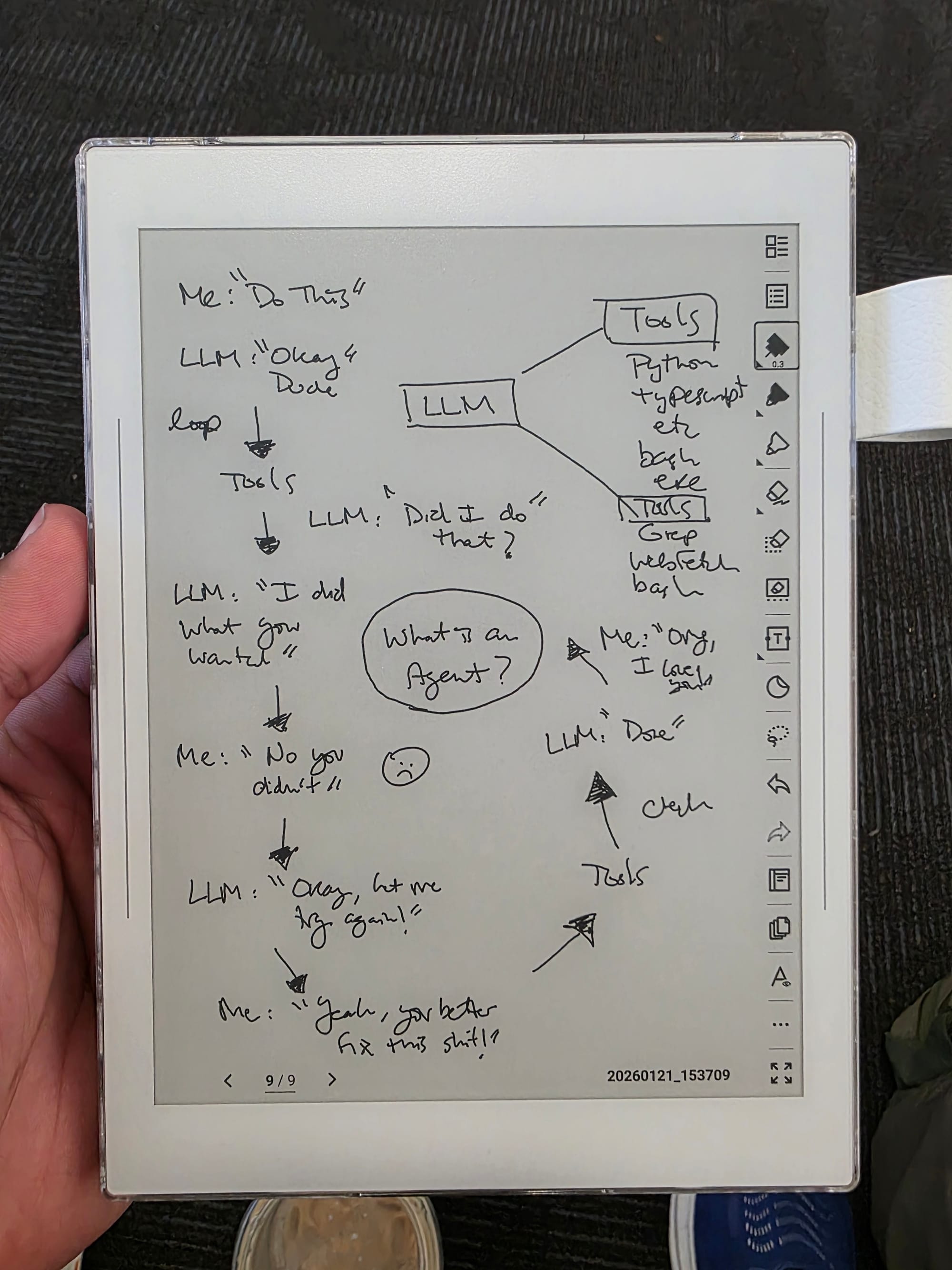
Ask it "What files are in the current directory?" and watch it call list_directory. Ask "What's in main.go?" and it calls read_file. Ask a follow-up question about the code it just read and it reasons over the tool results already in its conversation history.
The Pattern
Every agent framework — LangChain, CrewAI, LlamaIndex, Anthropic's Agent SDK — implements this same loop:
- Send messages (with tool definitions) to the model
- Check
stop_reason - If
"tool_use"→ execute the tools, append results, go to 1 - If
"end_turn"→ done
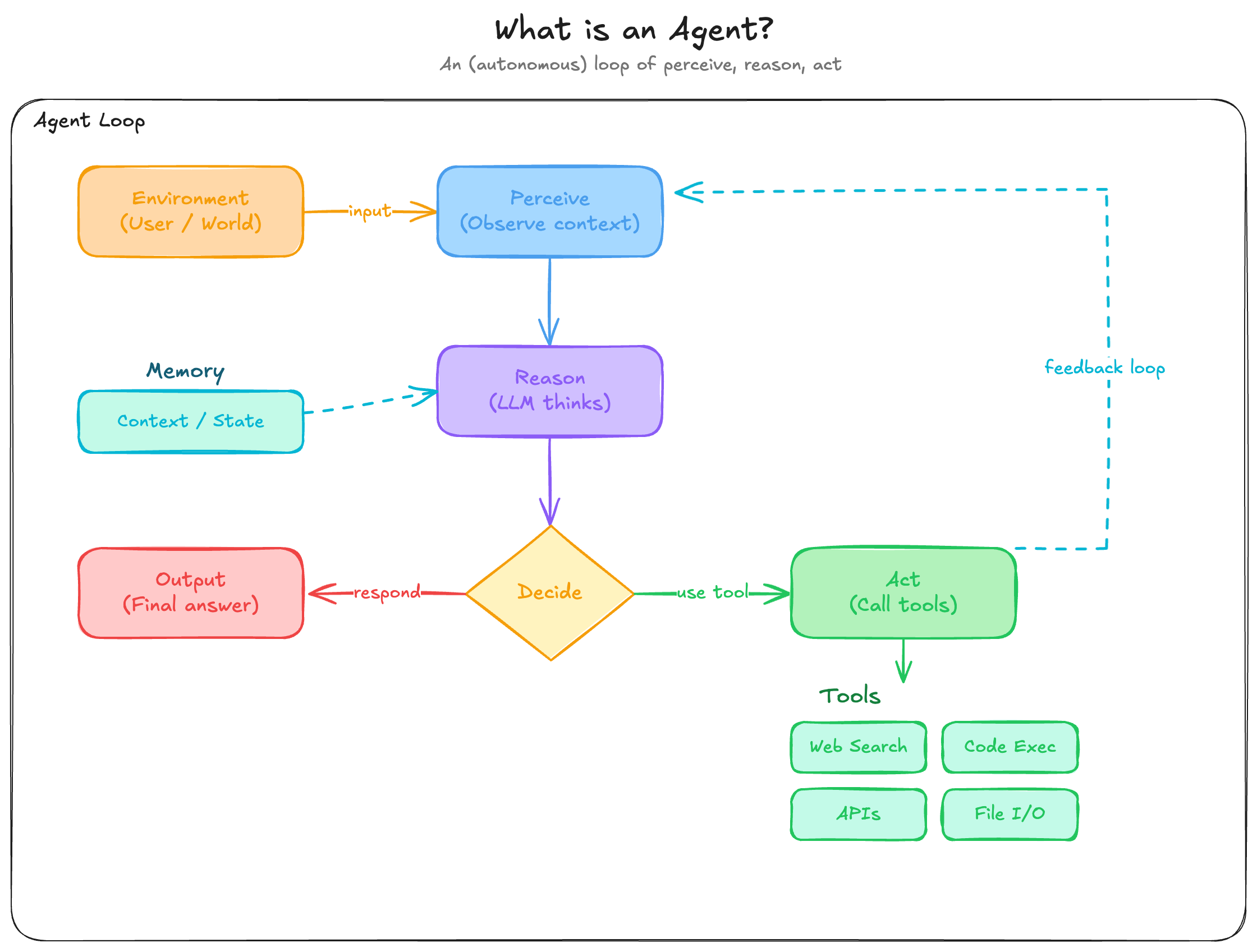
The frameworks add important things on top: error handling, input validation, streaming, retries, sandboxing, multi-agent orchestration, better tool libraries. Our code skips all of that on purpose — but the core is always this loop.
Understanding this changes how you think about agents. They're not magic. They're not "autonomous AI." They're a model in a loop, calling functions you wrote, with results you control. The "intelligence" is in the model. The "agency" is in the loop.
When to Use a Framework
Our raw implementation skips a lot. Production agents need:
- Error handling — network failures, rate limits, malformed responses
- Input validation — sanitize tool inputs before execution
- Streaming — show progress instead of blocking on long responses
- Retries — transient failures happen; don't crash on one bad request
- Sandboxing — don't let an agent run
rm -rf /without guardrails - Multi-agent orchestration — coordinate multiple specialized agents
Frameworks like Anthropic's Agent SDK give you battle-tested implementations of these concerns out of the box. The goal of this post isn't to avoid frameworks forever — it's to understand what they're doing so you can use them effectively instead of treating them as black boxes.
Build from scratch first. Then let a framework handle the plumbing.
What's Next
You've got a working agent. Here's where to go from here:
- Add more tools.
write_file,run_command,web_search— every tool you add makes the agent more capable. The loop doesn't change. - Add streaming. Server-sent events let you print tokens as they arrive instead of waiting for the full response. Better UX, same loop.
- Try a framework. Now that you understand the pattern, Anthropic's Agent SDK becomes a force multiplier instead of that black box for you. Frameworks are great! And they really enable you to focus on building your custom use cases instead of so much plumbing.
- Apply the pattern. Code review bots, documentation Q&A, GRC automation, data pipelines, research assistants — the loop works for any domain. Just add the right tools and logic essentially.
I hope this post helps you understand agents better. They're not magic. They're just a loop. And now you can build one from scratch!